Development Environment
Setup Local Development Environment
To setup a local development environment, the developers should follow the steps below:
Install pixi
Clone the repository and make a feature branch based off
next.Create a new virtual environment with
pixi installActivate the virtual environment with
pixi shellActivate the pre-commit hooks with
pre-commit install
The pyproject.toml contains all of the dependencies for both the developer and the build servers.
Update file pyproject.toml if dependencies are added to the package.
Developing with PyCharm
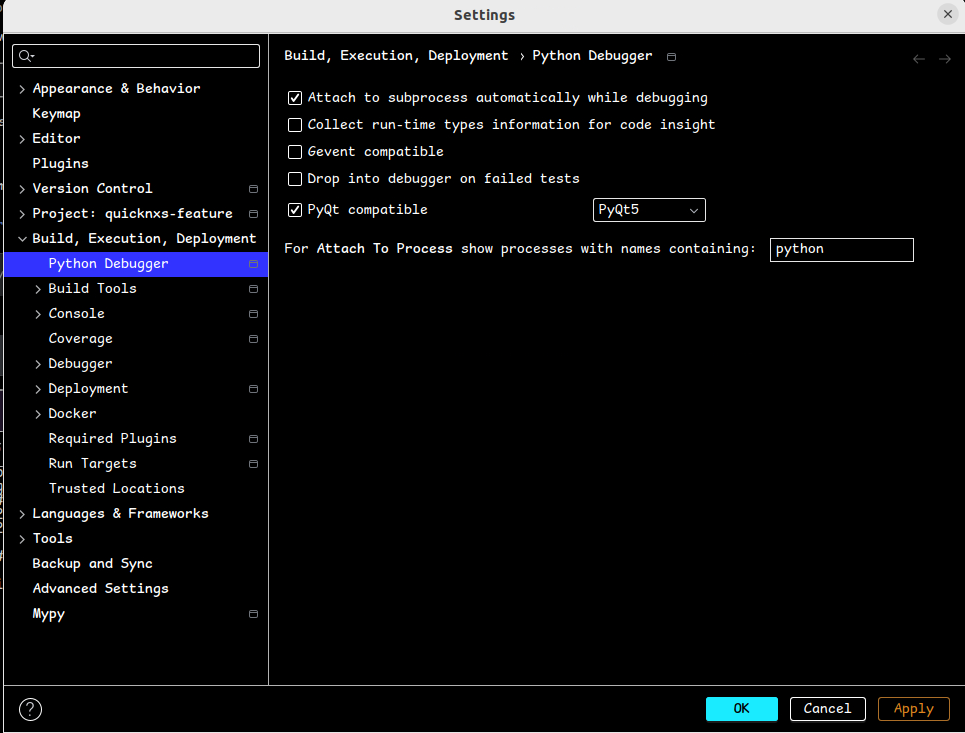
Currently, QuickNXS contains PyQt5 and PiSide6 which are not compatible with each other and therefore one must be selected as the default bindings to Qt. Open the PyCharm settings and select PyQt5 as the default bindings to Qt in the python debugger.
Test Data
The test data will be stored in a second git repository quicknxs-data which uses git-lfs. To use it, first install git-lfs, then setup the git-submodule
git submodule init
git submodule update
See also how to write integration tests