Reduction
Reduction Options
After clicking the Reduce button in the main Reflectometry GUI, the Reduction Options dialog window appears. This window allows you to configure various settings for the data reduction process. See the image below for reference.
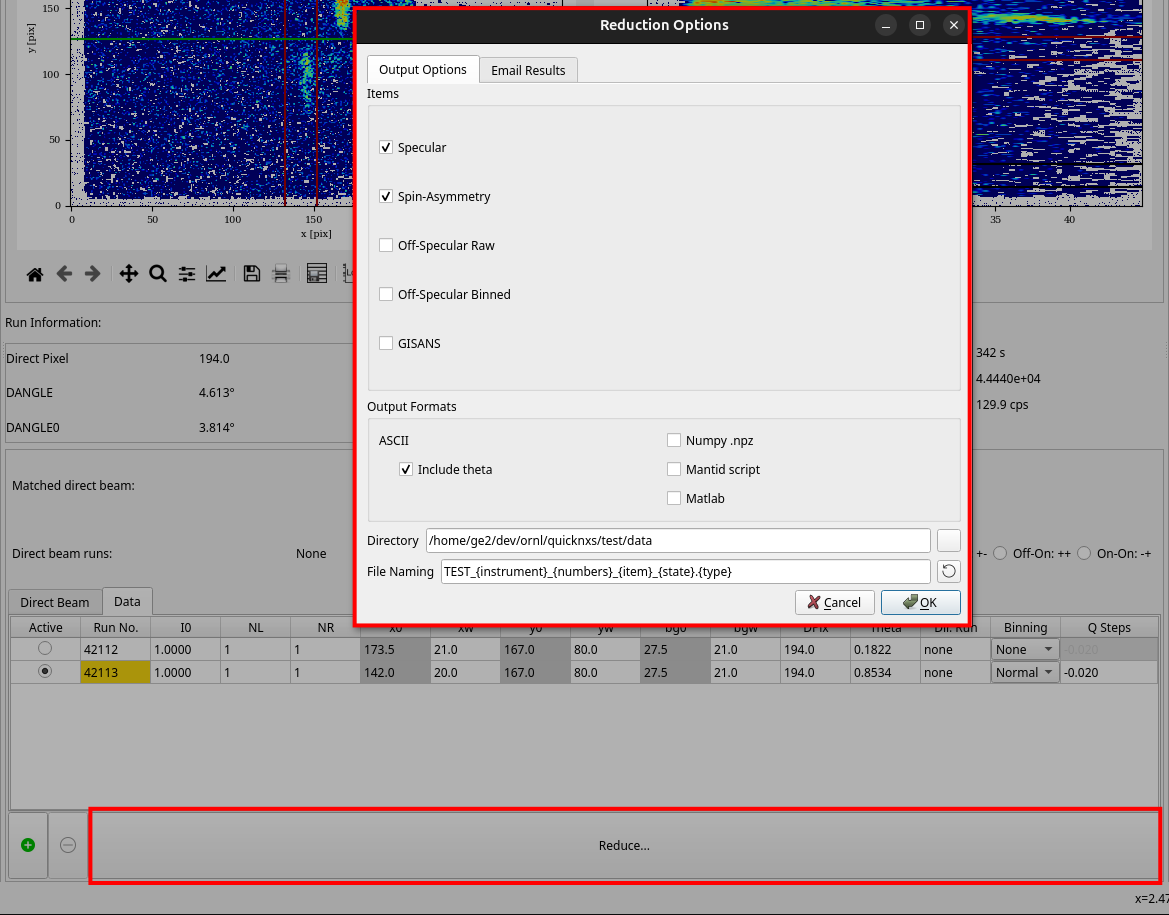
Reduction Output
After successful reduction using the default settings, a number of .dat and .ort files are generated in the
output directory, the names and contents depending on which items are selected in the Reduction Options dialog window.
For detailed information on the format of the output files, see the page on QuickNXS Output File Format.
For example, below is a list for run peaks 42535_1 and 42536_1. The particular cross-sections will depend on the instrument settings, which for these runs turn out to be “Off_Off” and “On_Off”.
REF_M_42535+42536_peak1_Specular_Off_Off.dat: combined reflectivity curve for the “Off_Off” cross-section.
REF_M_42535+42536_peak1_Specular_On_Off.dat: combined reflectivity curve for the “On_Off” cross-section.
REF_M_42535+42536_peak1_Specular_SA.dat: spin asymmetry (SA) of the combined reflectivity.
REF_M_42535+42536_1_combined.ort: combined reflectivity curve for all cross-sections for the run peaks (ORSO ASCII format).
REF_M_42535_1.ort: reflectivity curves for all cross-sections for run peak 42535_1 (ORSO ASCII format).
REF_M_42536_1.ort: reflectivity curves for all cross-sections for run peak 42536_1 (ORSO ASCII format).